Web Workers, and how to actually use them
A Web Worker runs your JavaScript on a second thread, so heavy work never freezes the page. To make it concrete I build a batch image processor - drop in a folder of photos and get back a grid of WebP thumbnails - and use it to show how workers, message passing, transferable objects, and a worker pool fit together.
The issue
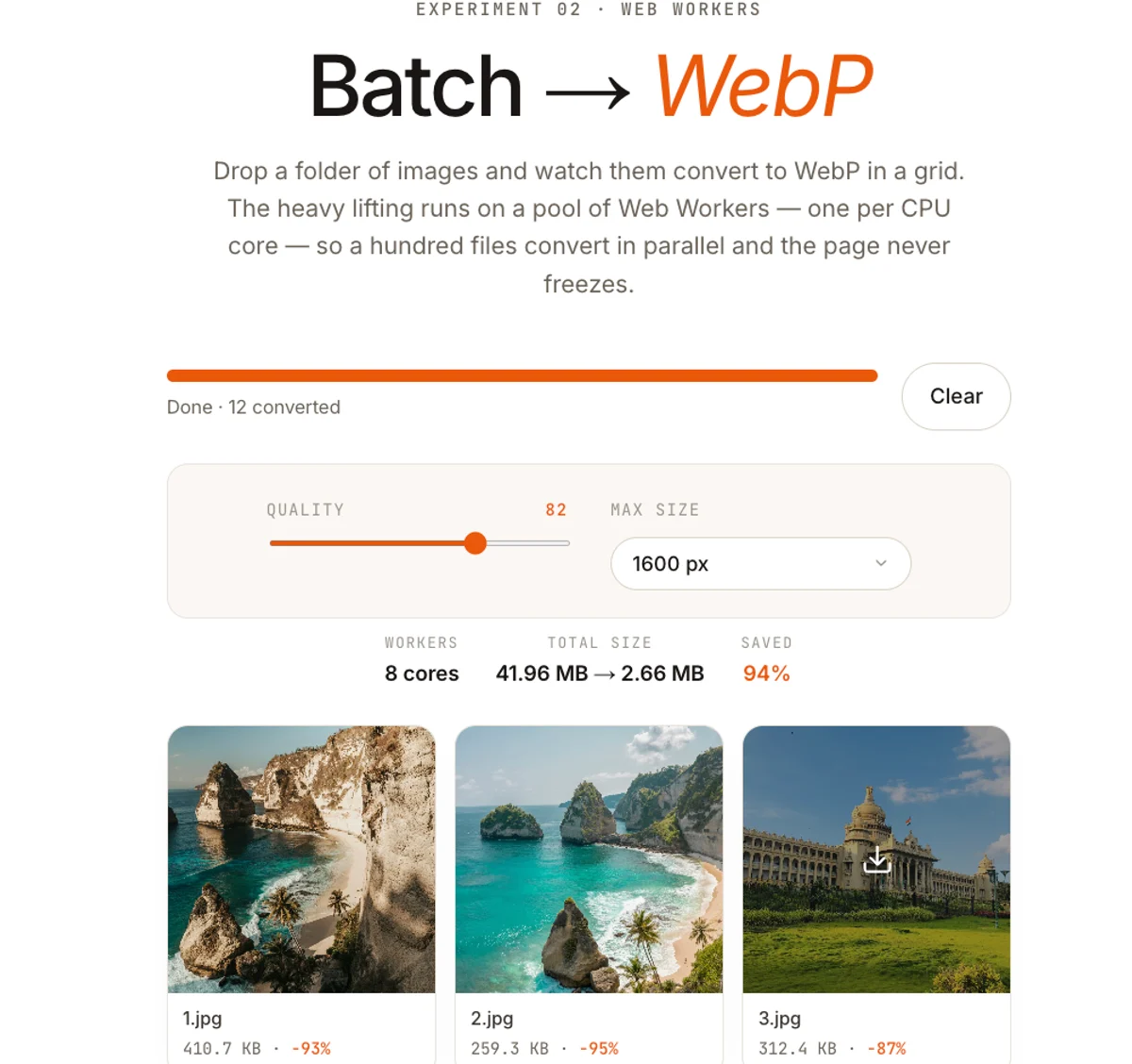 Try the live demo
 In Issue 001 I built a small tool that takes one image and hands back a much smaller WebP. It runs entirely in the browser, on a <canvas>, and for a single file it's instant. This issue asks the obvious follow-up: what happens when it's not one image but a whole folder - a batch processor that ingests a hundred photos and lays their WebP versions out as a grid of thumbnails? Do it the naive way and the page freezes solid. The fix is to get that work off the main thread, and the tool for that is the Web Worker.
Everything below is the real thing, not pseudocode - it's exactly what powers the demo above, and the full source is on GitHub. The snippets here are lifted straight from it.
The page has one thread, and you're sharing it
A browser tab runs almost everything on a single main thread: your JavaScript, the layout calculations, and the actual painting of pixels. They take turns on the same event loop from the Namaste JavaScript notes. While your code is running, nothing else can - no click handlers, no scrolling, no repaint.
Converting one image takes a few milliseconds, so the thread is handed back before you notice. Convert a hundred in a loop and your code holds the thread for seconds. The page can't respond to anything until the loop ends, so the tab appears frozen - the classic jank of doing heavy CPU work in the wrong place.
A Web Worker is a second thread
A Web Worker runs a separate script in its own global scope, in parallel with the page, on a different thread. It has no access to the DOM - no document, no window - and it shares no variables with your page. The only connection is a message channel: you call postMessage to send data in, and listen for messages to get results back.
Move the converter into a worker
Here's the lucky part. A worker can't use a <canvas> element (that's DOM), but it has OffscreenCanvas - a canvas with no page attached - plus createImageBitmap to decode and convertToBlob, the worker-side twin of canvas.toBlob. That's the entire WebP pipeline from Issue 001, available off the main thread. The decode → resize → encode steps move across almost unchanged.
Two real-world wrinkles make it into the actual file. First, results carry an ok flag - a Done | Failed union - because in a batch of a hundred, one corrupt file shouldn't take the rest down; the worker catches and reports it as a failed tile. Second, Safari can't encode WebP through a canvas (per the spec it silently hands back a PNG), so when convertToBlob returns a non-WebP blob we re-encode with the same @jsquash/webp WASM codec the single-image tool uses - dynamically imported only when that fallback is actually hit.
/// <reference lib="webworker" />
// Runs on its own thread. No DOM - but createImageBitmap, OffscreenCanvas,
// and convertToBlob are all here, which is the whole WebP pipeline.

export type Job = { id: number; file: File; quality: number; maxDimension: number };
export type Done = {
  id: number; ok: true; blob: Blob;
  width: number; height: number; inputBytes: number; outputBytes: number;
};
export type Failed = { id: number; ok: false; error: string };
export type Result = Done | Failed;

// WASM WebP encoder - lazily fetched, and only ever on the Safari path.
let encoderPromise: Promise<typeof import("@jsquash/webp/encode").default> | null = null;
const loadEncoder = () =>
  (encoderPromise ??= import("@jsquash/webp/encode").then((m) => m.default));

function fit(w: number, h: number, max: number) {
  const cap = max > 0 ? max : Math.max(w, h);
  const scale = Math.min(1, cap / Math.max(w, h)); // never upscale
  return { width: Math.round(w * scale), height: Math.round(h * scale) };
}

async function convert(job: Job): Promise<Done> {
  const { id, file, quality, maxDimension } = job;

  // 1 - DECODE (EXIF rotation baked in)  2 - RESIZE the longest side down.
  const bitmap = await createImageBitmap(file, { imageOrientation: "from-image" });
  const { width, height } = fit(bitmap.width, bitmap.height, maxDimension);

  const canvas = new OffscreenCanvas(width, height);
  const ctx = canvas.getContext("2d", { alpha: true })!;
  ctx.imageSmoothingQuality = "high";
  ctx.drawImage(bitmap, 0, 0, width, height);
  bitmap.close(); // free the decoded pixels right away

  // 3 - ENCODE. Fast path: the browser's own WebP encoder.
  let blob = await canvas.convertToBlob({ type: "image/webp", quality });

  // Fallback: Safari handed back a non-WebP blob - re-encode with WASM.
  if (blob.type !== "image/webp") {
    const data = ctx.getImageData(0, 0, width, height);
    const encode = await loadEncoder();
    blob = new Blob([await encode(data, { quality: Math.round(quality * 100) })], {
      type: "image/webp",
    });
  }

  return { id, ok: true, blob, width, height, inputBytes: file.size, outputBytes: blob.size };
}

self.onmessage = async (e: MessageEvent<Job>) => {
  try {
    self.postMessage(await convert(e.data));
  } catch (err) {
    const msg = err instanceof Error ? err.message : "Could not convert this file.";
    self.postMessage({ id: e.data.id, ok: false, error: msg } satisfies Failed);
  }
};
Talking across the wall: postMessage
On the page side you create the worker, listen for results, and post jobs in. The File object rides along inside the message - postMessage runs the structured clone algorithm, which knows how to copy Files, Blobs, ArrayBuffers, typed arrays, Maps, and most plain data (but not functions or DOM nodes).
const worker = new Worker(
  new URL("./convert.worker.ts", import.meta.url),
  { type: "module" }, // a module worker: lets you import/export inside it
);

worker.onmessage = (e: MessageEvent<Done>) => {
  const { id, blob } = e.data;
  const url = URL.createObjectURL(blob);
  addTileToGrid(id, url); // append an <img src={url}> to the grid
};

// Kick off one conversion. The File is cloned into the worker.
worker.postMessage({ id: 1, file, quality: 0.8, maxDimension: 1200 });
Don't copy megabytes - transfer them
Structured clone is convenient but it duplicates the payload: send an 8 MB buffer and, for a moment, it exists twice. When you're already holding raw bytes, hand them over with a transfer list - the second argument to postMessage. The buffer's ownership moves to the worker: no copy, near-instant, and the original is emptied (its byteLength becomes 0) on your side.
// Read the file's bytes yourself, then transfer the buffer in.
const buf = await file.arrayBuffer();

// The second arg is the transfer list: ownership of `buf` moves to the
// worker. No copy. After this line buf.byteLength === 0 on this side.
worker.postMessage({ id, buf, type: file.type }, [buf]);

// Inside the worker, rebuild a Blob from the moved bytes:
//   const blob = new Blob([buf], { type });
//   const bitmap = await createImageBitmap(blob);
// Transferable: ArrayBuffer, ImageBitmap, OffscreenCanvas, MessagePort.
One worker isn't enough - build a pool
A single worker does move the work off the main thread, but it still processes its jobs one at a time. Your machine has more cores than that. The answer is a pool: create one worker per core - sized to navigator.hardwareConcurrency - put the jobs in a queue, and feed each worker the next job the moment it reports back.
The scheduler is the small pump() method at the bottom. It's deliberately dumb and work-conserving: whenever a worker is idle and the queue isn't empty, hand it the next job. You never pre-assign jobs to a particular worker - each one pulls more work the instant it frees up, so a fast image is never stuck behind a slow one and no core sits idle while jobs wait. dispose() is the matching teardown: terminate every worker and drop the queue.
import type { Job, Result } from "./convert.worker";

type Task = { job: Job; resolve: (r: Result) => void };

// One worker per core, a queue, and a promise per job.
export class WebPPool {
  private idle: Worker[];
  private all: Worker[];
  private queue: Task[] = [];
  private busy = new Map<Worker, (r: Result) => void>();

  constructor(size = poolSize()) {
    this.all = Array.from({ length: size }, () => {
      const w = new Worker(new URL("./convert.worker.ts", import.meta.url), {
        type: "module",
      });
      w.onmessage = (e: MessageEvent<Result>) => {
        this.busy.get(w)?.(e.data); // settle the caller's promise
        this.busy.delete(w);
        this.idle.push(w);          // this worker is free again
        this.pump();                // pull the next job, if any
      };
      return w;
    });
    this.idle = [...this.all];
  }

  convert(job: Job): Promise<Result> {
    return new Promise((resolve) => {
      this.queue.push({ job, resolve });
      this.pump();
    });
  }

  dispose() {
    for (const w of this.all) w.terminate();
    this.all = this.idle = this.queue = [];
    this.busy.clear();
  }

  // The scheduler: give every idle worker the next queued job.
  private pump() {
    while (this.idle.length && this.queue.length) {
      const w = this.idle.pop()!;
      const { job, resolve } = this.queue.shift()!;
      this.busy.set(w, resolve);
      w.postMessage(job);
    }
  }
}

// One worker per core, clamped to a sane range.
export function poolSize() {
  const cores = typeof navigator !== "undefined" ? navigator.hardwareConcurrency : 4;
  return Math.max(2, Math.min(cores || 4, 8));
}
Drive the batch, fill the grid
Now the batch driver is almost trivial. Hand every file to the pool at once; it runs them N-at-a-time and settles each one independently. Because each promise resolves the instant its worker finishes, you append that tile right away - the grid fills in progressively instead of appearing all at once at the end. The ok flag splits each result into a finished thumbnail or a failed tile, and a simple countdown tears the pool down the moment the last job settles.
const pool = new WebPPool();
let remaining = files.length;

files.forEach((file, id) => {
  pool.convert({ id, file, quality: 0.8, maxDimension: 1600 }).then((res) => {
    if (res.ok) {
      // Each tile shows up the moment ITS worker is done.
      addTile(id, {
        url: URL.createObjectURL(res.blob),
        saved: 1 - res.outputBytes / res.inputBytes, // how much we shaved off
      });
    } else {
      markFailed(id, res.error); // one bad file doesn't sink the batch
    }

    // Last job settled → terminate the workers; nothing left to do.
    if (--remaining === 0) pool.dispose();
  });
});
The grid itself is plain CSS - no library needed. auto-fill with a minmax track lets the thumbnails reflow to fit whatever width they're given. One subtlety bit me here: putting aspect-ratio: 1 on the frame isn't enough, because a tall portrait in normal flow stretches the box past its square via its min-content height. The fix is to take the image out of flow - absolutely fill the frame - so the ratio always holds and object-fit: cover center-crops every photo to a uniform tile.
.grid {
  display: grid;
  grid-template-columns: repeat(auto-fill, minmax(132px, 1fr));
  gap: 12px;
}
.tile {
  position: relative;
  aspect-ratio: 1;     /* every tile is a square... */
  overflow: hidden;
  border-radius: 8px;
}
.tile img {
  position: absolute;  /* ...and the image can't stretch it */
  inset: 0;
  width: 100%;
  height: 100%;
  object-fit: cover;   /* center-crop, no distortion */
}Getting the files in: a dropped folder is a trap
There's a catch before the pool ever sees a file. When you drop a folder onto the page, it does not appear in dataTransfer.files - that list is empty. You have to walk the filesystem-entry tree the drop exposes through webkitGetAsEntry(), and the one rule that trips everyone up is that you must read those entries synchronously inside the drop handler - capture them first, then recurse, because the item list is gone by the time an await resolves.
async function filesFromDrop(dt: DataTransfer, limit: number): Promise<File[]> {
  // Grab the entries NOW - the item list is only valid during the event.
  const entries = [...dt.items]
    .map((it) => (it as any).webkitGetAsEntry?.())
    .filter(Boolean);

  if (entries.length === 0) return [...dt.files]; // loose files, not a folder

  const out: File[] = [];
  for (const entry of entries) await walk(entry, out, limit);
  return out;
}

async function walk(entry: any, out: File[], limit: number): Promise<void> {
  if (out.length >= limit) return;
  if (entry.isFile) {
    out.push(await new Promise((res, rej) => entry.file(res, rej)));
  } else if (entry.isDirectory) {
    const reader = entry.createReader();
    let batch: any[];
    // readEntries returns ~100 at a time - loop until it's empty.
    do {
      batch = await new Promise((res, rej) => reader.readEntries(res, rej));
      for (const child of batch) await walk(child, out, limit);
    } while (batch.length > 0);
  }
}
Selecting a folder through the file picker is the easier half: a second <input> with the webkitdirectory attribute set turns the browse button into a folder picker, and its files list already arrives flat.
The gotchas
When to reach for a worker
The rule of thumb: workers are for work that is CPU-bound and chunky - image and video encoding, parsing big files, crypto, compression, running WebAssembly. That's work that would otherwise hold the thread for tens of milliseconds or more. For work that's mostly waiting - a fetch, a timer, a database round-trip - you don't need a worker at all; plain async already keeps the main thread free. Our batch image processor is squarely in the first camp, which is exactly why it's the perfect thing to hand to a pool of workers.